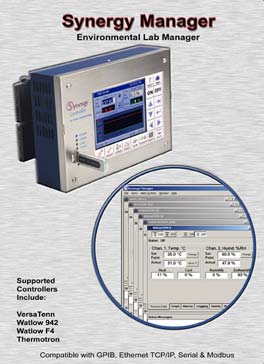
Supports the following Chambers Controllers: Synergy Micro Synergy Nano VersaTenn II VersaTenn III VersaTenn IV VersaTenn V Watlow 942 Thermotron T4800 Yokogawa 550/750 Partlow 1460/1462 Blue M 550/750 Watlow F4
P/N: TE1566-1 for USB equipped computers (USB dongle)
P/N: TE1566-2 for legacy computers (parallel port dongle)
Features
Designed specifically for Environmental Test Chamber Control
The main features of the Synergy Manager are:
Remote Control. Communicate via Ethernet TCP/IP, RS-232, GPIB-IEEE 488, and RS-485 protocols.
Communicate to any one of the different supported controllers, in any combination.
Profile Creation, Download and Control. Write a test profile once, and run it on any of the different controllers.
Store and archive thousands of profiles on a server for backup/restore.
Data Logging and Graphing. Download, control, monitor, record and graph environmental test data on multiple chambers
simultaneously.
Alert System. Set up alarms for absolute limits and setpoint deviation limits with, e-mail, fax, and pager notification.
Screenshots
Data Control & Observation
Each individual chamber control window has eight data tabs at the bottom. Each of these tabs covers a different category of data control and observation. As a collection, the eight data tabs present a complete, real-time, view of the state of each chamber.
Process Datadisplays setpoints and actual temperature and humidity data.
Graphs - displays etpoint and actual temperature and humidity data on a line graph.
Alarms - sets and monitors process alarms such as maximum allowed temperatures.
Logging - logs setpoint and actual temperature and humidity data and PID values to a text file.
Events - displays status of events, dipswitch settings and logical inputs.
Profiles - allows users to create and download test profiles to a chamber.
Messages - displays a list of all application and chamber error messages.
Info - displays diagnostic chamber and communication protocol data and settings.
Profile Editor
Write profiles once and run anywhere
Synergy Manager enables users to create test profiles directly on their PC. LED based controllers are often difficult to use for test
profile creation. Their limited display capabilities lead to cryptic labels and confusing navigation processes.
Using the Synergy Manager's graphic windows interface simplifies the test profile creation process.
Every step is clearly displayed in one window. Step creation and data editing is one mouse click away.
Profiles are generic and may be downloaded to any of the supported chambers.
After creating a test profile in the Profile Editor, you can view it in graph format by pressing the Graph button.
The resulting graph displays the entire test run, including jump loops.
With graphical analysis you can more clearly see exactly what your profile steps represent.
Email and Fax Alert System
Set up alarms with e-mail, fax, and pager notification.
In addition to monitoring and control, the Synergy Manager employs a highly customizable Alert Notification System.
Once enabled, any specified recipients are notified of all errors and alarms via email or fax.
The alarms are separated into eight categories. The user can assign a different priority to each category.
For example, you might want all chamber alarms to have a high priority and be emailed immediately upon the sounding of the alarm.
However, for communications errors that may be caused by transient noise on the line, you may want to have set as a low priority.
All low priority errors would then be compiled in a general report that is mailed out once a week.
The exact definition of each priority level is also user definable: high, medium or low priority items can be specified as sent immediately,
once an hour, once a day or once a week, at any specified time.
Monitor-Only Mode (Free) and Full Feature Mode comparison
The Synergy Manager can operate in both a free monitor-only mode and a full featured mode. The software is available for
download from the downloads section at the bottom of this page. To enable the full featured mode contact Tidal Engineering
to purchase a USB or parallel port key. The capabilities of each mode are listed in the table below. Version upgrades
are posted to the website periodically and are free to all users.
Specifications
Monitor-Only Mode
Full Feature Mode
Monitoring
Log Records
6K
64K
Profile Editing for VersaTenn V, Pro-Touch and Synergy Controllers
Profile Editing for other Controllers
Profile Download Capability
Profile Control
Setpoint Control
On/Off Control
Event Control
Alert Alarm System
Downloads
The Synergy Manager software is free to download and will operate in Monitor-only Mode without
the security Dongle. Contact Tidal Engineering to purchase a Dongle to enable the Full Feature Mode
of the software. The
Synergy Manager Revision History text file contains a list of features added to each version of the Synergy Manager.
10/22/05 - Tidal further enhances the Synergy Manager PC-based controller software for
multi-chamber / multi-manufacturer test environments. Software Features "Write Once, Run Everywhere" Functionality for True State-of-the-Industry Efficiency, Integration, and Interconnectivity. See the
press release.


 Get Acrobat Reader



 Synergy Manager
  Synergy Micro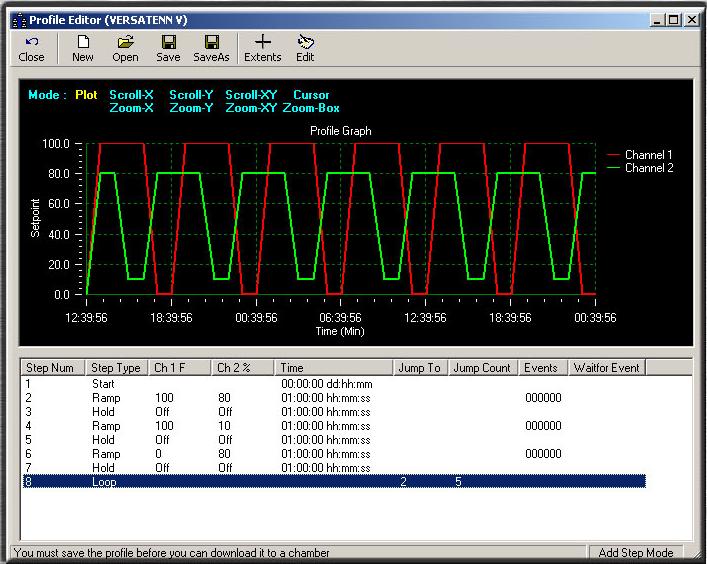
 Email and Fax Alert System